


User Status for Network Contacts
Brosix provides status options for keeping users up to date on their contacts’ availability.
Help Users Stay Informed on Their Colleagues’ Availability
Working remotely or in separate offices in the same building means that you can’t always see when a colleague is busy. That’s where user status comes in. With Brosix’s User Status feature, users can easily keep their contacts constantly informed about their availability.
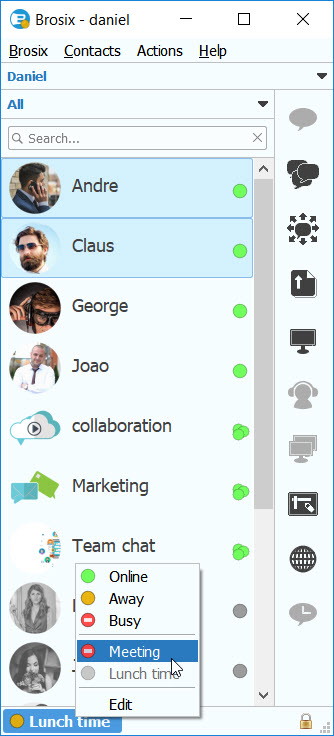
Brosix’s User Status feature allows users to set their online status to three standard options– Online / Away / Busy. There’s also an option for custom statuses that provide even more details on a user’s availability.
Automatic Away Statuses
In order to save time, Brosix automatically checks and sets a user’s status to “Away” after a period of inactivity on their computer. In this way, colleagues will know that the user isn’t at their computer at the moment and are unavailable to respond to questions.
Create Unique Statuses
The User Status feature also allows users to create unique individual text statuses, providing more information regarding a user’s availability. Statuses such as “Away: I am out for lunch” or “Busy: I am in an important meeting,” can help teams stay informed. Users can also assign a unique status to the Auto-Reply feature of the text chat, and Brosix will automatically reply to any incoming messages.
For more details please read the How to set up Auto-reply article.