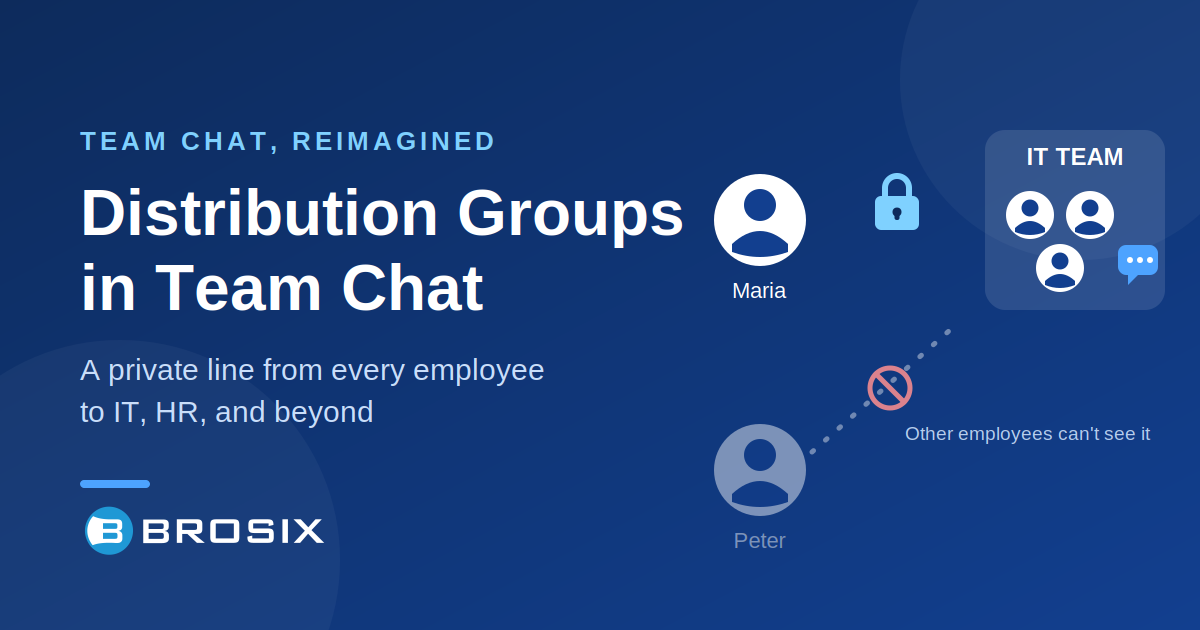
Every company has departments that the whole team needs to reach — and conversations that the whole team should never see.
An employee messages IT about a locked account. Another asks HR a question about parental leave. A field worker at a client’s site needs a quick, private word with the office. In all of these cases, the same two requirements collide:
- Anyone should be able to reach the department.
- Only the department — and that one employee — should see the conversation.
Email solved this decades ago with distribution groups and shared inboxes. Ticketing systems built entire products around it. But as more companies move their internal communication from email to real-time chat, they discover something surprising: standard team chat wasn’t built for this workflow at all.
Why a Regular Group Chat Can’t Do It
Imagine a company with 120 employees trying to set this up in an ordinary chat room:
- Put everyone in one “IT Support” room? Now every employee sees every other employee’s IT requests. Confidentiality is gone — and for HR topics, that’s simply unacceptable.
- Keep only the IT team in the room? Now regular employees have no natural way to write to it.
- Have IT reply in a direct message? The response becomes a private 1-on-1 thread between one technician and the employee. The rest of the IT team loses visibility, can’t step in, and can’t see the history if the issue comes back next week.
The reason is architectural. What companies are really asking for is a shared inbox model — many people writing in, one team seeing everything, replies going back only to the original sender. That’s the paradigm of helpdesk and email systems, not of chat rooms. Which is why you won’t find “distribution groups” as a native feature in mainstream chat platforms: it’s a different way of thinking about conversations.
Yet the need is real, and it’s growing. Companies don’t want to force employees back into email or a heavyweight ticketing system for a two-line question. They want the speed and simplicity of chat — with the confidentiality guarantees of a shared inbox.
The Brosix Approach: A Dedicated Support Conversation for Every Employee
In Brosix, this workflow is straightforward to organize using private chat rooms — no plugins, no custom development, no complicated permission matrices.
The pattern is simple: for each employee, create a dedicated private room with the department team.
For example:
- “IT Support – Maria” contains Maria and the entire IT team
- “IT Support – Peter” contains Peter and the entire IT team
- “HR – Maria” contains Maria and the HR staff
That’s it. The structure itself enforces the rules:
- Maria has one clear, always-available place to write to IT
- Only the IT team sees her messages — Peter sees nothing of Maria’s conversations
- Every IT team member sees the full thread with Maria and can jump in to help
- Replies reach Maria and only Maria — it’s impossible to answer the wrong person, because the room is the address
- The complete history with each employee lives in one place, so recurring issues come with full context
There are no special permissions to configure and nothing that can be misconfigured into a privacy leak. Membership is the security model. If you’re not in the room, the conversation doesn’t exist for you.
A simple naming convention — “IT – Last name, First name” — keeps rooms sorted and searchable, and unread indicators show the team exactly where attention is needed.
Where This Structure Shines
IT support. The classic case: everyone needs to reach IT, nobody should browse their colleagues’ issues, and the whole IT team needs shared visibility to respond fast.
HR. Questions about salary, leave, health, or workplace concerns are exactly the conversations that must stay between the employee and HR — while still being visible to the whole HR team rather than trapped in one person’s DMs.
Field and home-care staff. An employee working at a client’s or patient’s location all day still needs a reliable, private channel back to the office team — from a phone, not an office PC.
Client communication. The same structure works outward. Advisory firms, agencies, and service providers can give each client a dedicated conversation with the entire team at the office: the client writes to one familiar place, and everyone on the account sees it and can respond. For services where responsiveness is part of the product, fast chat beats email threads every time.
Familiar for Employees, Available Everywhere
One advantage of building this on Brosix deserves its own mention: the people using it don’t need to learn anything.
Employees — or clients — get a clean, consumer-style chat application that works the way messaging apps already work. There is no training session, no manual, no “how do I file a request” onboarding. They open the app, find their support conversation, and type.
And they can do it from anywhere. Brosix runs on Windows, macOS, Linux, Android, iOS, and the web — so this structure works for the technician at their desk, the employee working from home, and the field worker on a phone at a client’s site.
That’s a sharp contrast with the older tools companies are often migrating from. Legacy LAN messengers only work inside the office network and typically have no mobile apps at all — the moment an employee steps outside, the channel goes dark. At the other extreme, large corporate platforms bury simple needs under layers of configuration; setting up and administering them is a project in itself, and even then, this confidential department-line structure isn’t something they offer out of the box.
Brosix sits deliberately in the middle: powerful enough to support the structure, simple enough that both admins and employees actually enjoy using it.
A Real-World Example
A company in the energy sector with around 120 employees recently came to us with exactly this requirement. They were moving away from a legacy internal messaging system built around distribution groups: every employee could write to “IT” or “HR,” only the department received the messages, and replies went back privately to the sender.
Using dedicated support conversations in Brosix, they replicated the guarantees that mattered — confidentiality by design, full team visibility on every thread, replies that can only reach the right person — inside a modern chat application their employees could also use on mobile and outside the office, which their previous system could not offer.
For the initial rollout, our team helped set up the room structure based on their employee and department lists, so the company could start with everything already in place.
Getting Started
If this communication structure fits your company — or your client service — here’s the short version of how to approach it:
- List your “departments”: the teams that need a confidential line (IT, HR, management, an account team, etc.)
- Define who’s on each team — these members will be in every conversation for their department
- Create a dedicated private room per employee (or client) per department, using a consistent naming convention
- Tell people where to write. One sentence is usually enough: “Need IT? Open your IT Support room.”
The Brosix team is happy to help you plan and set up the structure for your organization — just reach out, and bring your team list.
Modern work is moving from tickets to conversations. With the right structure, chat can deliver the confidentiality of a shared inbox with the speed of instant messaging — and your employees will never look back at the ticket queue.
Ready to try it? Start your free Brosix trial or talk to our team about setting up department support conversations for your company.