


Chat History
You don’t need to remember your previous conversations anymore!
Keeping track of all of your communications on your IM Network can be a challenge. Recalling details from a conversation with a colleague about a common project, for example, can be difficult. With the Brosix Chat History Feature, all of your text chats are recorded locally on your computer, and you can review your previous chat sessions at any time. This allows you to easily recall the details of all of your individual and group communications on the Brosix network. You can now stop trying to remember every conversation!
Record and search for chat communications with ease
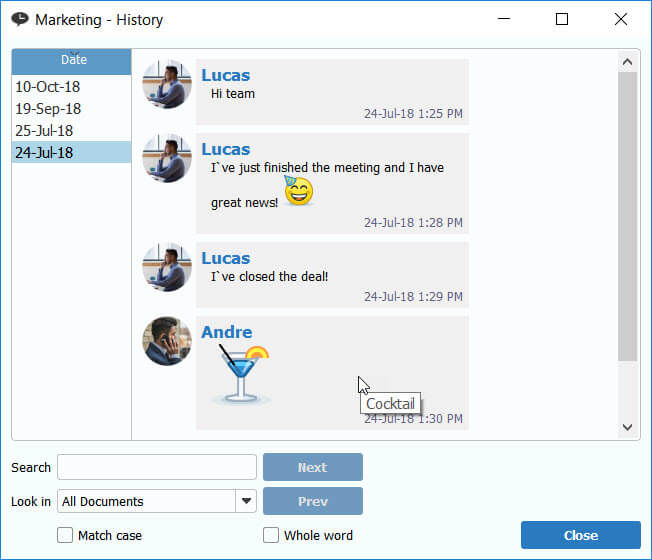
The chat history browser – simple, easy-to-use, and intuitive. You can easily review your previous conversations or conduct a keyword search using the search tool. This allows you to recall one conversation with a specific colleague, or all conversations on a specific topic with several colleagues. You can also search for conversations by a specific date, allowing you to recall a conversation even if you forget exactly with whom you were communicating.
Synchronize Chat History Across Devices
Brosix users often use more than one device to access their network. The Local Chat History feature gives you an initial synchronization option which you can enable for your network. This option allows users to download their chat history on new devices in order to pick up previous conversations where they were left off.
Opening a chat history
With Brosix you have two easy to use options for searching your chat history. You can open the chat history browser either from a chat window or from the main messenger window:
- When you use a chat window, click on the chat history button:

- From the main messenger window, select a name from your contact list and then click on the chat history icon.

Searching in the history database
To review an old conversation, you can search for it by date or keyword through the search engine at the bottom of the window.