


Free Online Whiteboard Drawing Feature to Brainstorm, Sketch, and Share Ideas
What Is an Online Whiteboard?
An online whiteboard is a digital tool that allows users to visually collaborate, draw, create diagrams, brainstorm ideas, and more in real time over the internet. Online whiteboards provide a virtual space for users to simulate the experience of using a physical whiteboard.
Get Started With Our Whiteboard Online Drawing Feature
Draw your ideas.
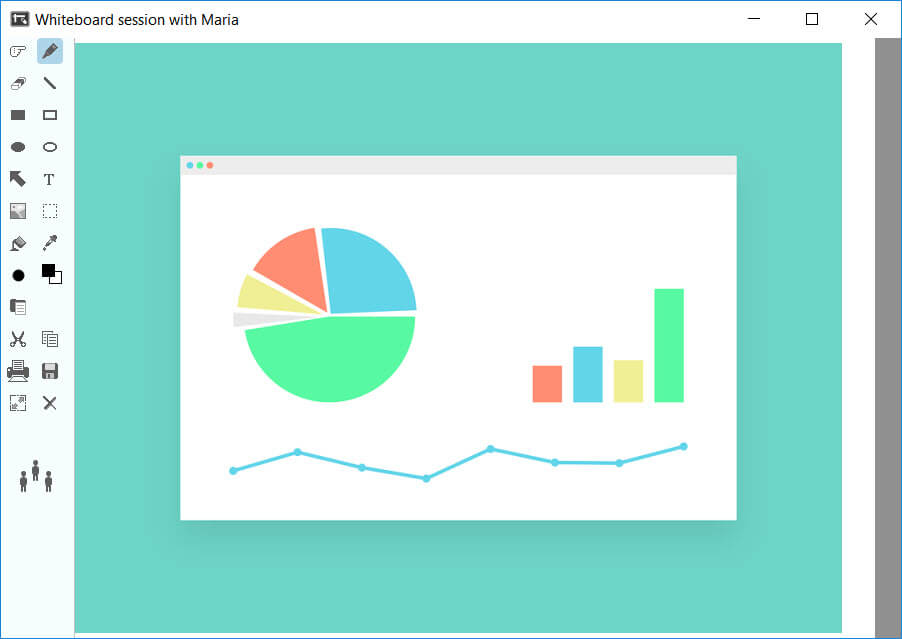
Whiteboard sessions at Brosix are available on all pricing plans, including the free account. Start drawing today!
- Select a name from your contacts list.
- Click the “Whiteboard” icon on the top right corner to open your web whiteboard.
The following tools are available:
- Pointer
- Pen tool (Free hand)
- Eraser
- Draw a line
- Draw a rectangle
- Draw an ellipse
- Draw an arrow
- Add text
- Add picture
- Select an area
- Fill an area
- Color picker
- Pen width
- Choose a color
- Paste
- Cut
- Copy
- Save
- Resize
- Clear
We let you save time and get started quickly with the pen icon on your left toolbar, called “Free hand.” Simply use the drawing tools provided by the platform, such as inserting shapes and colors, making it easy to collaborate whether you’re on a tablet or desktop. You can create sketches, diagrams, or any visual content by selecting the particular tool and moving your cursor.
If you need to undo your actions and start all over again, the easiest way is to click “clear,” and you’ll have a blank whiteboard to fill in again.
Why Create a Whiteboard?
Brosix customers have already found multiple ways to make the most of our free online whiteboard for drawing, including:
Presenting information
Whether you are developing a flowchart for your organization or stressing the importance of the goals ahead, our virtual whiteboard feature can be incredibly useful. Used together with the other Brosix tools such as audio chat, our whiteboard is a very effective method for presenting ideas visually.
Interactive discussions
Teams can use the online collaborative whiteboard functionality to hold real-time discussions and better engage with a range of information. With our whiteboard, teams can provide visual revision suggestions for marketing materials, feedback on presentation visuals, or edits to text, to name just a few.
To let your colleagues access your board, you don’t have to share a whiteboard link or open a web browser. You can invite other teammates with just a couple of clicks.
Brainstrom and share ideas together
Whiteboard tools provide colleagues with a virtual collaboration space where they can compile their thoughts and ideas. The visualization tools allow you to draw and write anything that can help spark creativity and boost team collaboration.
Can I Export the Content Created on Brosix’s Web Whiteboard Tool?
Yes. You can save your content in various formats, such as JPG and PNG, and then share the board instantly. Furthermore, you can directly print it.
What Are the Benefits of Real-Time Collaboration on Online Whiteboards?
Real-time collaboration on an online whiteboard enables users to work together simultaneously, allowing for instant feedback, idea sharing, and interactive brainstorming sessions. It saves time and enhances teamwork and productivity by facilitating communication in a virtual setting.